A selection of exciting tutorial blog sites for photographers and designers courtesy of the Lightstalking blog.
29/06/2011


28/06/2011
24/04/2011
Firefox 4 Tab Problem
A couple of days ago the facility to open a blank Tab in Firefox 4 stopped working. This particular problem related to the new tab button. Whenever I click on the plus (+) symbol to open a new tab window, nothing seems to be happening. Clicking on File and then on the New Tab option doesn’t opens the new tab. Neither do the Ctrl + T works.
A Google for "Firefox 4 tab problem" suggested that the problem was caused by "Ask Toolbar" being incompatible with Firefox 4! I was not even aware I had the "Ask Toolbar" loaded! A forum thread offered the following solution:-
These are the steps to uninstall the Ask Toolbar from Windows XP, Windows Vista and Windows 7:-
For Windows XP:
A Google for "Firefox 4 tab problem" suggested that the problem was caused by "Ask Toolbar" being incompatible with Firefox 4! I was not even aware I had the "Ask Toolbar" loaded! A forum thread offered the following solution:-
These are the steps to uninstall the Ask Toolbar from Windows XP, Windows Vista and Windows 7:-
For Windows XP:
- Make sure all the Web browsers or there processes are closed.
- Go to Start menu and Select “Control panel” and then select “Add/remove Programs”
- Search the Ask Toolbar from the list of programs installed (or the program with Ask logo)
- Click on Change/Remove to uninstall it.
- Always close all the instance of Web Browsers or related programs.
- Go to the following path Start > Control Panel.
- Under Programs icon select “uninstall a Program”
- Now Select the “Ask Toolbar” from the list and click on “Uninstall”
- Go to the following path: Start > Control Panel > Programs > Uninstall a Program.
- Select the Ask Toolbar from the list of installed programs and right click to Uninstall.
04/04/2011
Firefox 4 Google Toolbar Problem - Fix - Updated
UPDATE: 25th April 2011 - The problem seems to have been resolved by a recent software update.
Since I upgraded to Firefox 4 I have been unable to select from the search box drop-down list
When you attempt a search from the search box on your Google Toolbar it may not allow you to select items from your drop-down list of web history or search suggestions.
As a workaround, try using your keyboard up and down arrows to navigate the drop-down list to select your search history, press return to select.
See previous post link
Since I upgraded to Firefox 4 I have been unable to select from the search box drop-down list
When you attempt a search from the search box on your Google Toolbar it may not allow you to select items from your drop-down list of web history or search suggestions.
As a workaround, try using your keyboard up and down arrows to navigate the drop-down list to select your search history, press return to select.
See previous post link
22/03/2011
Microsoft Program Stops Responding
The program stops responding when you try to open or to save a file in an Office 2002 program, in an Office 2003 program, in an Office 2007 program, or in an Office 2010 program.
You know the scenario, you are dashing to get off to college, the post is about to go or you have been typing for 2 hours and just remembered to save the doc for the first time. You open the save menu and click on a folder and the screen goes pale and you notice those dreaded words in the toolbar, (Not Responding), the program hangs. What do you do other than go and make a cup of tea? While you wait to see what happens!
I have Googled for a solution on a number of occasions but without luck. Today I found this Microsoft Support Article ID: 313937. It seems to have worked. The gist of the solution is making sure you have no "Mapped Network Drives" which are not connecting. See the article for the full story.
You know the scenario, you are dashing to get off to college, the post is about to go or you have been typing for 2 hours and just remembered to save the doc for the first time. You open the save menu and click on a folder and the screen goes pale and you notice those dreaded words in the toolbar, (Not Responding), the program hangs. What do you do other than go and make a cup of tea? While you wait to see what happens!
I have Googled for a solution on a number of occasions but without luck. Today I found this Microsoft Support Article ID: 313937. It seems to have worked. The gist of the solution is making sure you have no "Mapped Network Drives" which are not connecting. See the article for the full story.
USB Drive Not Recognised: TestDisk
Awesome Utility: TestDisk
What do you do when your USB Memory Stick/Drive is not recognised when you try to read it. Well if it has the only copy of your dissertation the response probably lies somewhere between suicide and mucking your pants! That is what happened to a friend today, can I help, how can I not. Quick Google identified suggested the best option was a command line utility called TestDisk. Long time since I did DOS and stuff. The hard part was finding an idiot proof set of instructions how to use Testdisk! The nearest I ,managed was at SysAdminHell a post titled Awesome Utility: TestDisk. I suggest you download TestDisk and then go to the instructions at SysAdminHell.I found placing TestDisk on another USB Drive worked best for me. After a bit of trial and nor too much error I managed to get the USB drive to boot. I looks as though the FAT32 Boot sector was corrupt. BEWARE of NOT EJECTING your USB Drives!
24/01/2011
Photoshop CS5 - Importing Scanned Images
Following on from my previous post about image resolution. I came across this Adobe TV tutorial by Peachpit TV for Photographers, which complements that post.
The tutorial covers the basics of scanning images for retouching and then goes on to show some basic retouch techniques. One useful tip relates to the use of the History Brush, not something I have ever used but I may after watching this.
Not sure who the the young lady is who gives the tutorial be she is easy to listen to for a change.
The tutorial covers the basics of scanning images for retouching and then goes on to show some basic retouch techniques. One useful tip relates to the use of the History Brush, not something I have ever used but I may after watching this.
Not sure who the the young lady is who gives the tutorial be she is easy to listen to for a change.
23/01/2011
The Myth of 72 dpi

There is so much fascinating information on this site I hardly knew where to start. So I chose the 72 dpi debate as this is the one that seems to crop up most frequently. The article you need to read is called "Say No to 72 dpi". Wayne not only talks a good talk he provides visual proof of his arguments as well.
Did you know why you should download images off the internet rather than cut and paste them? I suggest that you have a good look around Waynes site, it is a goldmine of fascinating information.
Other useful websites I came across whist looking for this information are included below.
Scanning and Printing Resolution Calculator
Image size Calculator
Fotosizer - Batch image resizing
09/12/2010
CAPS LOCKED ON
Had one of those strange occurrences this morning whilst working on my dissertation in Word, I hit the wrong key(s) which keys I have no idea and suddenly I AM TYPING IN CAPS AND NOTHING I DID WOULD TURN IT OFF. WHICH WAS A BIT OF A BALL ACHE AS I WAS FINISHING OFF A DRAFT OF MY DISSERTATION AND ABOUT TO DASH OFF TO A TUTORIAL. Enough of that! I hastily Googled "CAPS LOCKED ON KEYBOARD" and tried the first option in the list. They suggested holding down both shift keys at the same time and count 5 - BINGO it worked!
04/11/2010
Art Book Publishers You Should Know
Here a list of exciting publishers. They produce art books, limited artist editions, zines, comics, posters, chapbooks, original web books, freely accessible online archives, and exhibitions.
www.violetteeditions.com/
http://corrugatedpress.com/adjnoun.html
www.charnelhouse.com/
www.yyzbooks.com/
www.wsworkshop.org/
www.kudetalosangeles.com/
www.othercriteria.com/
www.philip-wilson.co.uk/
www.fantagraphics.com/
www.ammobooks.com/
www.iconoclasteditions.com/
www.philip-wilson.co.uk/
www.pictureboxinc.com/
http://primaryinformation.org/
www.silverbridge.name/
www.badlandsunlimited.com/
http://markbattypublisher.com/
www.uglyducklingpresse.org/
www.2ndcannons.com/
www.bywaterbros.com/
www.violetteeditions.com/
http://corrugatedpress.com/adjnoun.html
www.charnelhouse.com/
www.yyzbooks.com/
www.wsworkshop.org/
www.kudetalosangeles.com/
www.othercriteria.com/
www.philip-wilson.co.uk/
www.fantagraphics.com/
www.ammobooks.com/
www.iconoclasteditions.com/
www.philip-wilson.co.uk/
www.pictureboxinc.com/
http://primaryinformation.org/
www.silverbridge.name/
www.badlandsunlimited.com/
http://markbattypublisher.com/
www.uglyducklingpresse.org/
www.2ndcannons.com/
www.bywaterbros.com/
02/11/2010
Firefox Background Removal
21/08/2010

19/08/2010

26/04/2010
Ipod/Iphone Caps Lock
To enter my router WEP password requires numbers and CAPS to be entered. It has driven me crackers entering CAPS when the default is lower case. I discovered the following fix:-
Settings -> General -> Keyboard -> Enable Caps Lock
Once this is enabled, tapping the shift key twice will turn on caps lock. When the caps lock is enabled, it will glow blue.
Brilliant
UPDATE
Not so brilliant, the caps lock will not stay locked as you toggle back and forth between alpha and numeric keyboards, bummer!
However - the simple answer is to enter your WAP password into Notes app and then when you need it cut and paste, simple really. It works for all my other network passwords as well, hooray!)
Settings -> General -> Keyboard -> Enable Caps Lock
Once this is enabled, tapping the shift key twice will turn on caps lock. When the caps lock is enabled, it will glow blue.
Brilliant
UPDATE
Not so brilliant, the caps lock will not stay locked as you toggle back and forth between alpha and numeric keyboards, bummer!
However - the simple answer is to enter your WAP password into Notes app and then when you need it cut and paste, simple really. It works for all my other network passwords as well, hooray!)
24/03/2010
Downloading a Quicktime Movie
I normally use the Firefox plug-in DownloadHelper to rip streaming video like YouTube or embedded movies, however occasionally it does not respond to embedded Quicktime movies. Here is a solution.
This only works with Firefox. Open the webpage containing the Quicktime video. On the Firefox toolbar at the top of the screen, click "Tools". Halfway down the page click on the button that says "Page Info". In the menu that opens click on the "Media" tab. Look down the list for the movie. It is possible that the entry will be greyed out, ignore this and highlight the entry. Further down the same page, towards bottom right, click on "Save As" and save the .mov file to wherever you want to store it.
Step 1 Saving the Movie
Click on the Tools button on the top of the page, go down and click on "page info"
Step 2 Get set up to download the video
A window with tabs will pop up. Click on the Tab marked Media
Step 3 Find the Video and save it
You look through the page info box until you find the Video you want. After you have found the video you click save as, enter the name you want it saved as, and save it!
Step 4 Update
If you want to download flash games off, like addicting games or anygaming website. All you have to do is download it like if it was a video like i showed and open it with your internet browser. And the best thing is that, when ever you play it, it will be the full screen. enjoy
This only works with Firefox. Open the webpage containing the Quicktime video. On the Firefox toolbar at the top of the screen, click "Tools". Halfway down the page click on the button that says "Page Info". In the menu that opens click on the "Media" tab. Look down the list for the movie. It is possible that the entry will be greyed out, ignore this and highlight the entry. Further down the same page, towards bottom right, click on "Save As" and save the .mov file to wherever you want to store it.
Step 1 Saving the Movie
Click on the Tools button on the top of the page, go down and click on "page info"
Step 2 Get set up to download the video
A window with tabs will pop up. Click on the Tab marked Media
Step 3 Find the Video and save it
You look through the page info box until you find the Video you want. After you have found the video you click save as, enter the name you want it saved as, and save it!
Step 4 Update
If you want to download flash games off, like addicting games or anygaming website. All you have to do is download it like if it was a video like i showed and open it with your internet browser. And the best thing is that, when ever you play it, it will be the full screen. enjoy
Quicktime Controls Invisible in Firefox 3.5.8
When using Quicktime viewer in Firefox the control bar at the bottom of the console is usually blacked out and the controls are invisible. Curiously they do show very occasionally. Anyway here is a fix.
1. Right click on the browser icon the main icon on your Desktop of in tool bar not the one at the top left of the browser window.
2. Select properties
3. Go to the compatibility tab
4. Check the box for "Run this program in compatibility mode for:"
5. Make sure it says "Windows XP (Service Pack 2)" in the drop down list.
6. Press "OK" at the bottom
7. Reload Firefox
This solution will allow you to see the normal Quicktime timeline and volume options, etc. when watching a Quicktime video.
1. Right click on the browser icon the main icon on your Desktop of in tool bar not the one at the top left of the browser window.
2. Select properties
3. Go to the compatibility tab
4. Check the box for "Run this program in compatibility mode for:"
5. Make sure it says "Windows XP (Service Pack 2)" in the drop down list.
6. Press "OK" at the bottom
7. Reload Firefox
This solution will allow you to see the normal Quicktime timeline and volume options, etc. when watching a Quicktime video.
20/01/2010
View or Print a File Directory/Folder
Have you ever wanted to print out a list a directory/folder list of files from Windows Explorer, a bit like this:-
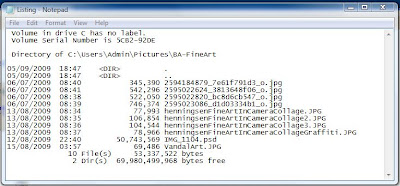
There is no simple way to do this in Vista, not sure about Windows 7 but I would be surprised if there was! The answer is to make a couple of tweaks to the registry, not as hard as it may sound and add a couple of files to the Windows directory/folder. There is a thread on the Vista Windows forum, which tells you how and provides the necessary files and registry tweaks, follow this link. It took me about 5 mins to work it out. The outcome will be two addition to the "Context Menu" as you will see from the screen-grab below. The option creates a text file in Notepad which you can view, edit and or print. Why don't Microsoft provide such an option? No don't answer that.


There is no simple way to do this in Vista, not sure about Windows 7 but I would be surprised if there was! The answer is to make a couple of tweaks to the registry, not as hard as it may sound and add a couple of files to the Windows directory/folder. There is a thread on the Vista Windows forum, which tells you how and provides the necessary files and registry tweaks, follow this link. It took me about 5 mins to work it out. The outcome will be two addition to the "Context Menu" as you will see from the screen-grab below. The option creates a text file in Notepad which you can view, edit and or print. Why don't Microsoft provide such an option? No don't answer that.

05/01/2010
Transferring BIG files
Have you ever had a problem sending a LARGE file to someone. Many email providers have an Max file size that you can send as an attachment. Sending films, PSD files etc can be a nightmare. I came across TransferBIGfiles How does it work? Here are the FAQ answers from the site:-
FAQ's
What is TransferBigFiles?
TransferBigFiles is the easiest way to share a bunch of files with friends, family or everybody in the world. There's no registration required to use the website. You can just go to the home page and start uploading some files.
What is the storage limit for my files?
TransferBigFiles does not limit the amount of space your account can use on our servers, the only storage limit we have is that your files may not be larger then one (1) gigabyte.
For how long are my files stored?
Files are stored for up to 5 days or until the download limit of 20 downloads is reached.
FAQ's
What is TransferBigFiles?
TransferBigFiles is the easiest way to share a bunch of files with friends, family or everybody in the world. There's no registration required to use the website. You can just go to the home page and start uploading some files.
What is the storage limit for my files?
TransferBigFiles does not limit the amount of space your account can use on our servers, the only storage limit we have is that your files may not be larger then one (1) gigabyte.
For how long are my files stored?
Files are stored for up to 5 days or until the download limit of 20 downloads is reached.
29/12/2009
Print off Google Calendar
Now is the time of year when my wife reminds me that she needs a new calendar. Being a cheapskate my normal practice is to open Outlook and print off the Outlook calendar, a month to a page, could not be easier.
But I now use Google Calendar to record my diary dates
There are a couple of solutions I found on the net, Wincalendar, being one, but it costs money. I found a workaround on the Google Calendar Forum it did not appear to work with my setup BUT after a bit of fiddling I managed to sort it out. So here is my solution:-
I use Firefox but I think this will work with IE as well.
Open your Google Calendar and set to show 1 month per page and set it to start at January 2010 unless you are reading this next year!
On the right hand side of the Calendar page there is a PRINT icon. When you click this you get a pop up window with a page view of the calendar. Choose the "Save As" option and click.
A further pop up appears with the options "Open With" or "Save File" choose "Save File".
Now the "Download" pop up appears, in my case this shows the calendar to have been downloaded as a PDF file. Right click on this and choose the option "Copy Download Link"
Open a text editor such as Notepad, Right Click and "Paste" you will find a link similar to the one below will appear (Don't Panic) This is the link to print off just January.
To print out the 12 months in one go you need to make a slight change to the link. Look for the numbers that I have highlighted, these are 20091228 and 20100201 you need to change the second one to read 20101231.
Select and Copy the link then paste into your Browser, in my case Firefox, and click. This will open up your default PDF software Acrobat Reader or in my case I use the Firefox PDF plugin Foxit Reader. This should display all 12 months of your calendar. You now can print off the 12 monthly pages.
"https://www.google.com/calendar/printable?ctz=Europe%2FLondon&dates=20091228%2F20100201&pgsz=letter&mode=MONTH&wkst=2&hl=en&src=YWpwZWVlQGdvb2dsZW1haWwuY29t&src=cGtobWwydDFhZTB1OGkxcGUyNXVybHJsOHNAZ3JvdXAuY2FsZW5kYXIuZ29vZ2xlLmNvbQ&src=ZDIxZHU5Zm92NHZkN2hnajNnZ2FhcWFzcmdAZ3JvdXAuY2FsZW5kYXIuZ29vZ2xlLmNvbQ&src=Z2ttYjA0M2UwNTBlM3RrMHJ0OWM1ZjNnazBAZ3JvdXAuY2FsZW5kYXIuZ29vZ2xlLmNvbQ&src=ZXFubmswamc3NmU5MWdhbjMzbGtpcDZzMDRAZ3JvdXAuY2FsZW5kYXIuZ29vZ2xlLmNvbQ&src=NW41ODBoM2tjcTlucmxqb2twdjY0cWZyMHNAZ3JvdXAuY2FsZW5kYXIuZ29vZ2xlLmNvbQ&src=bmVhcm5pbmVAZ29vZ2xlbWFpbC5jb20&src=amVubmlmZXJtbW9uZXlAZ29vZ2xlbWFpbC5jb20&src=bDdjMjJ2YWFpb3RsYTdocnExcmszZTA3Zm9AZ3JvdXAuY2FsZW5kYXIuZ29vZ2xlLmNvbQ&src=dWtfX2VuQGhvbGlkYXkuY2FsZW5kYXIuZ29vZ2xlLmNvbQ&pfs=NORMAL&po=
14/08/2009
Samsung NC10 Sound Problem
I have a Samsung NC10 netbook and it is brilliant. The sound however has driven me mad. The speakers are tinny but worst of all the sound was horribly distorted even with earphones. After much fiddling I eventually found the solution. I opened the Realtek Sound Effect Manager in Control Panel. Under the Sound Effect tab there is a Karaoke icon, make sure that there is no X showing in the circle. If there is click to turn off. Set the environment to Padded Cell. Success sound back to normal! Make sure all the equaliser sliders are on Max
Subscribe to:
Posts (Atom)