28/02/2013

Word 2010 Spell Check Language Not Correct

I just realised that my spell checker keeps offering American spelling as a correction ie favor instead of favour. The document language was set to English (UK) so why the problem? Apparently you have to set the Proofing language, mine was set to English (US) for some strange reason. 
So here is how you change it...
In Word 2010 select the following options from the Ribbon:
  1. Review tab > Language group > Language button > Set Proofing Language
  2. In the Language dialog, select the language you want to use for spell checking.
In Word 2007, Review tab > Proofing group > Set Language will accomplish the same thing.

Word 2010 Insert Endnote at end of a Section

The menu layout in Word 2010 is so frustrating at times. I wanted to insert Endnotes before my References, so I made a Section Break [Next Page] but the end notes came at the end of the 2nd section, ie after my Reference Section. After much searching I discovered the answer here.

This is the post which provided the answer, I hope you can follow it...
 ... make your changes directly in the Footnote and Endnote dialog, which you can open with the dialog launcher in the bottom right corner of the Footnotes group on the References tab? Select Endnotes, select "End of section," select the desired number format, select Continuous (assuming you're putting them all at the end), and make sure "Whole document" is selected under "Apply to."

Screen Clip - Footnote Endnote Menu
Finding the answer was a problem because Word 2012 does this differently to previous versions of word and many of the answers that come up are for the older versions.

26/02/2013

Picasa not Downloading Video or RAW Files from my Camera

I have been using Picasa for ages now and it is one of my favourite bits of software. I recently started to use it to upload images from my Canon G9 and G12. I have just realised it is not uploading video files nor is it showing RAW files, which it used to do. 

The solution seems to be quite a simple one. I discovered that in Tools> Options> File Type, I did not have the boxes for RAW or Videos checked. Interestingly when you tick the Video box another box appears with the option to select .mov (Quicktime) files as well. I ticked all the relevant boxes and suddenly Picasa is searching all my watched folders for the missing file types, and when I connected my camera it found and downloaded the video files.
Picasa >Tools> Options Screen Snip

16/01/2013

Slow Boot - Optimize Windows 7 for Faster Start-up

No matter how fast or shiny computers might be when they're new, they all seem to get slower over time. My Samsung NC10 netbook running Windows 7 was taking forever to start up so time for a sort out. As a yardstick they reckon if your computer is taking more than 45 secs to boot up there is something seriously wrong, mine was taking nearly 2 minutes. 

A quick Google throws up a bunch of useless information most of which is a disguise for selling you some 3rd party software solution. So I started with the Microsoft suggestions "Optimise Windows 7 for Better Performance".

First suggestion is to try the Performance Troubleshooter, which can automatically find and fix problems.
  •  Open the Performance troubleshooter by clicking the Start button Picture of the Start button, and then clicking Control Panel. In the search box, type troubleshooter, and then click Troubleshooting. Under System and Security, click Check for performance issues.
I discovered that about 10 programmes were opening at start-up. None was essential, Microsoft hides the essential programmes from view, so I chose the global option to close all. I rebooted as requested and amazingly the NC10 booted in 30 seconds which I call a result.

There are other things you can do, if you are not certain about the security status of your computer you may wish to double check you have no nasties lurking about on you HD. Make sure your ant-virus software is up-to-date and run a full scan. If you don't already have it, upload anti-malware software such as Malwarebytes, get the free version here. If you not up to speed with security software I suggest you have a look at this video by Britec09 on YouTube, this guy knows what he is talking about and there are no catches.

01/01/2013

Send to OneNote Printer Option Missing

With Microsoft OneNote installed in Windows 7 there is Print to OneNote option in the Printer List. Occasionally this can go missing. Here is a solution. 

Repair the Microsoft Office program installation

  1. Close all Office programmes.
  2. Click Start, and then click Run.
  3. Copy and then paste (or type) the following command in the Open box, and then press ENTER:
    appwiz.cpl
  4. In the Currently installed programs list, click the installed version of the 2007 Office program, and then click Change.
  5. Click Repair, and then click Continue
  6. Restart computer.

30/12/2012

Firefox - Right Click Menu Flickers

I am using Firefox 17.0.1. My second monitor an AOC 1950W was replaced after developing a fault. Immediately I discovered a problem when using Firefox. Right clicking on a web-page resulted in the Right Click Menu flickering and disappearing making it difficult if not impossible to select a menu item. There was no problem on the main display. Using Chrome on this display there was no problem.

I checked settings were correct and that drivers were up-to-date to no avail. A Google search for "firefox right click menu flickers" produced the following suggestion:-
Try to disable hardware acceleration.
  • Tools > Options > Advanced > General > Browsing: "Use hardware acceleration when available" .
If disabling hardware acceleration works then check if there is an update available for your graphics display driver.
Untick box and restart Firefox, this solved the problem.

14/12/2012

Ripping (Backing Up) DVD's and CD's

Due to the minefield of legislation covering the copying of propriety media such as DVD's and CD's one has to tread carefully when offering advice in this area. But given the damage that grand and not so grand kids can wreak on DVD's and the like "Backing Up" is no bad idea. I work on the misguided principle that providing such copies are for my own use and I have no intention of passing them on or off for gain or otherwise I feel my actions are justified or at least defensible. There are also occasions that I wish to send copies of my own work to various places and people as part of my art practice and studies so a "How To" reminder is in order. For those of a nervous disposition you ay want to read about the The Digital Millennium Copyright Act - DMCA!  This information is available via the website Doom9.net the guy who runs this very succinct site about all things "Ripping" obviously knows his subject and conveniently brings all the info together in one place, so that's the place to go for more info.


As I "Back Up" DVD's and CD's so infrequently I can never remember what I did last time I did it so I decided on a Blog Post to remind me.

I have tried DVD Decrypter and DVD Shrink, they both seem to do the ripping just fine. If you have problems with encryption or copyright protection then DVD Decrypter is probably the best choice. You can find Guides on how to use this software on Doom9.

The Death of Microsoft Live Mesh

Re Blogged from ghacks.net
Anyone here still using Windows Live Mesh? The service allowed you to synchronize data between multiple PCs years before Microsoft made the switch to SkyDrive as its main synchronization and data hosting service. Microsoft today announced that Windows Live Mesh will be discontinued on February 13, 2013 as a consequence of that shift towards SkyDrive. Part of what made Windows Live Mesh great on Windows and Mac OS X has already been worked into SkyDrive, Microsoft calls that the DNA of Mesh that has been brought over.

04/12/2012

How to Open PNG Images in Picasa

Picasa doesn’t automatically include Portable Network Graphics (PNG) images by default. You can however view PNG images in your Picasa photo library and open them in Picasa for editing from the Picasa Photo Viewer application. You can also set PNG images to always open in Picasa Photo Viewer. It just needs a change to the <Preferences>.

How to Open PNG Images in Picasa
  1. Open Picasa.
  2. Click the Tools menu in Picasa and select Options.
  3. Click the File Types tab at the top of the Options window.
  4. Enable PNG image support by clicking the PNG check box and clicking “OK.”
  5. Click the Tools menu and select Configure Photo Viewer.
  6. Click the PNG check box in the Photo Viewer Configuration window to open all PNGs in the Picasa Photo Viewer by default, if desired, and click “OK.”
If Picasa does not update missing PNG files automatically, add PNG files to your Picasa library by clicking the File menu and selecting Add File to Picasa or Add Folder to Picasa. Picasa also automatically adds to your library PNG images in folders it’s already watching.

Adapted from a post on eHow.com

18/10/2012

Microsoft Wireless Mouse 5000 Scroll Problem


I recently installed a new keyboard and mouse, a Microsoft Wireless 5000. The first thing I noticed was the scroll wheel on the mouse seemed to have a mind of its own. But most annoying was that the scroll wheel did not work at all with some programmes, namely Picasa, a programme I use quite frequently. After fiddling with the settings I still could not solve the problem. There were lots of posts on the net about this problem but no solutions. I eventually came across the suggestion of changing the mouse to a different type in the configuration. I chose "Standard Wireless Optical Mouse", see the screen grab below. hen go to the "Wheel Button" drop down menu and choose auto-scroll. The mouse and scroll button now works perfectly with Picasa.


28/06/2012

Read It Later - Firefox Add-On to Save Web Page to Read Later

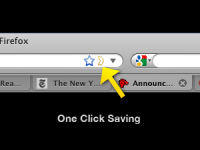
I use Firefox browser and invariably have loads of tabs open for pages I intend to read later or just that I just want to remember. The important ones I tag with Delicious but for the rest I usually end up closing them down and then inevitably as soon as I do that I need to look at one. Firefox has an Add-On called Read-It-Later also available as an iPhone and Android App as Pocket. With this Add-On you can save web pages to read later with just one click, the icon appears in the URL dialogue as yellow outline chevron.
When you have time, access your reading list from any computer or phone, even without an internet connection!

You can find the Add-On in the Firefox menu >Tools >Add-Ons (Ctrl-Shift-A)

I will report back when I find out if it helps with my problem.

01/05/2012

iDevice Hell

I started with and iPod Touch then the iPhone arrived and now I have an iPad. Whilst I love the user interface of these products I hate iTunes. I never really got to grips with it when I had the iPod, now I have the other 2 pieces of kit I am totally confused. Why does it have to be so difficult to manage the devices and my PC and my Netbook. I have never been the same since I zapped everything from my iPod just when I thought I had it cracked, my confidence has been shattered.

04/04/2012

Dell Monitor Power Button Failure


The power (on/off) button on my Dell 2407 WFP-HC monitor failed, fortunately in the ON position. Despite the monitor being about 8 years old it works perfectly well and I had no intentions of trashing it, so was it fixable? Lo and behold first Google search result was a YouTube video, in 4 parts, of how to repair the power button on a Dell 2407 WFP monitor by thinkofwhy.

I would advise watching all 4 videos before starting. Watch out where he mentions removing the stand and rear cover in part 4.  Removing the rear cover will make the removal of the circuit board that holds the switches much easier and its replacement. It is important to replace the button in the correct orientation, that is with the line vertical. Before I got to dismantling my monitor I discovered that if I used a blob of Blue Tack pressed on the button and turned the button to the correct orientation I could operate the button.

The problem is if your button fails in the OFF position you will not be able to watch these videos.  From the number of comments on the video's this is a common problem with this and other Dell monitors so even if yours is working ok check these instructions out before it is too late.

Part 1       
Part 2
Part 3
Part 4

23/03/2012

Create a Photobook

The family album is almost a thing of the past. Now we share photographs by passing round the mobile phone or the camera or if you are a bit more tech savvy you may post the images on Facebook, an Internet image sharing site like Flickr, Photobucket, Shutterfly etc. Or you may even have your own photoblog or website. Other alternatives are Digital Photo Frames, CD's DVD's etc. My son-in-law uses his Playstation and shows his on the TV. Or more likely you have thousands of images on the Hard Drive of you r PC or Laptop which no one will ever get to see.

The only problem with digital storage of photographs is the media is prone to corruption or deterioration or obsolescence! How may sorts of storage media have there been in your lifetime. How many more will there be in our kids or grandkids time?

In my opinion there is nothing like looking through a photo album. I am luck enough to have albums created by my grandfather who was a photographer in the early 1900's and my by my mother who was an avid snapper. She had the forethought to go through all her albums and notate the photographs with names, dates and places, which was fantastically helpful when I started on some family history research.

So what are the options? I decided two years ago to start putting photobooks together. I started by collecting together photographs of my 5 grandchildren. I used them to create a photobook for parents and grandparents as a present at Christmas. I am delighted to say that they went down a treat, everyone was delighted. Particularly the grandchildren who constantly refer back to them with great pleasure.

I use Blurb, you have two choices for creating your books an on-line publisher or a downloadable publisher, Both are easy to use and can be configured to be either simple to professional quality with various options in between. The site contains loads of help, videos, tutorials etc.  You can stop and start making your book, it is saved automatically and can be alterer right up until you place your order. If you do find a mistake or want to change something you can re-edit at any time.The finished books are excellent quality paper and feel and look like a professionally made book. Check out the website  and have a go.

Picasa v3.9 Update Available


Picasa, my favourite freebie photo editing software just had a major facelift. Picasa version 3.9 is now available to download or as an upgrade. I surprised to find a whole host of new goodies plus a few irritations, mainly changes to layout.

First the good stuff, there is increased connectivity with the net. A big green button for sharing on Google+, 24 new effects for twiddling your images and side by side editing, updated raw support. Also support for WebP is a new image format that provides lossless and lossy compression for images on the web.

On the irritating side they have moved some of the buttons off the toolbar at the bottom of the page, Movie and Collage in particular. Movie is changed its name to Video and is accessed through the Create drop-down menu. Or you can reinstate the Video (Movie) and the Collage buttons by going to Tools> Configure buttons> and use the Add option to place these buttons back where they belong. But why do they do these things in the first place?  More information from the Picasa website.

If you have never tried Picasa you should, it is more than just a photo editor, it will organise your images, catalogue them, sort out duplicates, prepare images for the web, create movies, slideshows, CD's and much much more. It will never take over from Photoshop but for some jobs it is a whole lot quicker and easier, removing red eye for example.

Download Picasa from here.

31/01/2012

Word 2022 Endnote Numbering Problem

If you are a skinflint like me and refuse to upgrade to the latest version of Windows Office you may find this workaround for a notorious Word 2002 bug helpful.

If you add Footnotes or Endnotes to a document and then delete one or more you will probably find the numbering goes bananas. I have tried every fix on the internet to sort it but only one works for me. 

Make your Endnote changes and save the document. use Ctrl+A to select the whole document, then Ctrl+C to copy. Open a NEW document (the page layout is not important) Ctrl+V to paste the document. You should note that the Endnote numbering is now correct. Ctrl+A to select this modified document. Go back to the original document which should still show that it is Selected, if not Ctrl+A again and then Ctrl+C to past in the modified document. Check that your modification has worked, if so Save. Best of luck!

28/12/2011

Print Google Calendar

Always useful at this time of the year, here is the link to my 2009 posting  - How to Print Off Google Calendar for the coming year - link  Tells you how to print off a month to a page for how ever many months you need, 12 in my case.

23/12/2011

Klipsch S4i Headphone Problem

I purchased a set of Klipsch S4i head/earphones from Amazon December 2010 for use with my iPod Touch. Not cheap at nearly £90, but amazing performance compared with the crap Apple earphones that came with the iPod. Apart from losing the ear plugs on a regular basis I had no problem with the phones, I eventually replaced these with some cheapo ones from another set of earphones, have not lost one since. All went well until about 3 weeks ago when the volume started having a mind of it's own going up and down without any intervention from me. Also the On/Off button stopped working. Inspection showed a crack in the rubber at the neck of the jackplug, see the photograph.
In my opinion there is a design fault in the moulding of the plug at this point. As you can see there is a indentation in the moulding which goes all the way through to the inner wire. Flexing the cable here impinges directly on the wire almost acting like a guillotine. I am sure that many users wrap the wire around the iPod when not in use. This does put a particular strain on the wire at this vulnerable point. I believe the problem could be solved by eliminating this notch from the moulding at this point thus spreading any bending effect over a larger radius and avoiding the pinching of the wire that the current design imposes.

When I checked my Amazon invoice I had purchased the phones on 7 Dec 2010. I sent off an email to Klipsch via the Amazon website. on 5th Dec 2011.  No immediate response, sent a reminder on 8th Dec and received a reply by return from the offices in Ireland saying a reply had been sent but had obviously not reached me. They asked me to send the phones back. Which I did by registered post on 9th Dec. A replacement set of phones turned up on 22nd Dec. So thanks to Amazon and Klipsch.

I have modified my replacement phones by pushing a short length of heat shrink sleeving over the jackplug to protect this weak spot.  

06/11/2011

Brother HL-2250DM Printer - Toner Light Stays On

When I changed the toner cartridge in my  Brother HL-2250DM printer the toner light stayed on and I could not print. I was not sure if  this was because I was trying a compatible toner cartridge for the first time or because I had taken the toner cartridge out without turning the printer off first or a combination of the two! This was the 3rd time I had changed the cartridge, previously I had used  Brother cartridges and not had a problem.

A Google search for an answer, found the following procedure suggested for different Brother printers but I thought I would give it a try and BINGO (Housey Housey) it seemed to work.

1. With the replacement cartridge installed. Turn power off

2. Open front cover ie access cover to toner cartidge

3. Hold GO button and turn power on

4. When all 3 lights are lit release and press GO twice

5. All lights should come on

6. With all lights on, press GO 5 times

7. Error light turns red and flashes

8. Close front cover


NOTE: In my case the toner light stayed on but the printer worked, however after a few minutes the toner light went out.*

You can also find instructions on the Ciberdirect website. **

PS. After I have installed a new cartridge I print off the "Printer Settings Page"  so I can check how many pages I printed from the previous cartridge. Press the Go button three times within 2 seconds. The printer will print the current printer settings page. The cartridges are supposed to be good for 2600 pages, I regularly get over 6000 pages by using "Toner Save Mode" setting and printing "Booklet" option for long documents.

Amended 7.2.12* and 2.2.14**

10/10/2011

Print a Secure PDF File or Convert to PDF

Neevia Document Converter makes it possible for anyone to instantly convert many of the file formats (doc, docx, xls, ppt..) that are used daily to PDF or Image. No need to install anything on your computer. Simply upload the file and select your delivery method.

Click link to for more info or to convert file - link