Here a list of exciting publishers. They produce art books, limited artist editions, zines, comics, posters, chapbooks, original web books, freely accessible online archives, and exhibitions.
www.violetteeditions.com/
http://corrugatedpress.com/adjnoun.html
www.charnelhouse.com/
www.yyzbooks.com/
www.wsworkshop.org/
www.kudetalosangeles.com/
www.othercriteria.com/
www.philip-wilson.co.uk/
www.fantagraphics.com/
www.ammobooks.com/
www.iconoclasteditions.com/
www.philip-wilson.co.uk/
www.pictureboxinc.com/
http://primaryinformation.org/
www.silverbridge.name/
www.badlandsunlimited.com/
http://markbattypublisher.com/
www.uglyducklingpresse.org/
www.2ndcannons.com/
www.bywaterbros.com/
04/11/2010


02/11/2010
Firefox Background Removal
21/08/2010

19/08/2010

26/04/2010
Ipod/Iphone Caps Lock
To enter my router WEP password requires numbers and CAPS to be entered. It has driven me crackers entering CAPS when the default is lower case. I discovered the following fix:-
Settings -> General -> Keyboard -> Enable Caps Lock
Once this is enabled, tapping the shift key twice will turn on caps lock. When the caps lock is enabled, it will glow blue.
Brilliant
UPDATE
Not so brilliant, the caps lock will not stay locked as you toggle back and forth between alpha and numeric keyboards, bummer!
However - the simple answer is to enter your WAP password into Notes app and then when you need it cut and paste, simple really. It works for all my other network passwords as well, hooray!)
Settings -> General -> Keyboard -> Enable Caps Lock
Once this is enabled, tapping the shift key twice will turn on caps lock. When the caps lock is enabled, it will glow blue.
Brilliant
UPDATE
Not so brilliant, the caps lock will not stay locked as you toggle back and forth between alpha and numeric keyboards, bummer!
However - the simple answer is to enter your WAP password into Notes app and then when you need it cut and paste, simple really. It works for all my other network passwords as well, hooray!)
24/03/2010
Downloading a Quicktime Movie
I normally use the Firefox plug-in DownloadHelper to rip streaming video like YouTube or embedded movies, however occasionally it does not respond to embedded Quicktime movies. Here is a solution.
This only works with Firefox. Open the webpage containing the Quicktime video. On the Firefox toolbar at the top of the screen, click "Tools". Halfway down the page click on the button that says "Page Info". In the menu that opens click on the "Media" tab. Look down the list for the movie. It is possible that the entry will be greyed out, ignore this and highlight the entry. Further down the same page, towards bottom right, click on "Save As" and save the .mov file to wherever you want to store it.
Step 1 Saving the Movie
Click on the Tools button on the top of the page, go down and click on "page info"
Step 2 Get set up to download the video
A window with tabs will pop up. Click on the Tab marked Media
Step 3 Find the Video and save it
You look through the page info box until you find the Video you want. After you have found the video you click save as, enter the name you want it saved as, and save it!
Step 4 Update
If you want to download flash games off, like addicting games or anygaming website. All you have to do is download it like if it was a video like i showed and open it with your internet browser. And the best thing is that, when ever you play it, it will be the full screen. enjoy
This only works with Firefox. Open the webpage containing the Quicktime video. On the Firefox toolbar at the top of the screen, click "Tools". Halfway down the page click on the button that says "Page Info". In the menu that opens click on the "Media" tab. Look down the list for the movie. It is possible that the entry will be greyed out, ignore this and highlight the entry. Further down the same page, towards bottom right, click on "Save As" and save the .mov file to wherever you want to store it.
Step 1 Saving the Movie
Click on the Tools button on the top of the page, go down and click on "page info"
Step 2 Get set up to download the video
A window with tabs will pop up. Click on the Tab marked Media
Step 3 Find the Video and save it
You look through the page info box until you find the Video you want. After you have found the video you click save as, enter the name you want it saved as, and save it!
Step 4 Update
If you want to download flash games off, like addicting games or anygaming website. All you have to do is download it like if it was a video like i showed and open it with your internet browser. And the best thing is that, when ever you play it, it will be the full screen. enjoy
Quicktime Controls Invisible in Firefox 3.5.8
When using Quicktime viewer in Firefox the control bar at the bottom of the console is usually blacked out and the controls are invisible. Curiously they do show very occasionally. Anyway here is a fix.
1. Right click on the browser icon the main icon on your Desktop of in tool bar not the one at the top left of the browser window.
2. Select properties
3. Go to the compatibility tab
4. Check the box for "Run this program in compatibility mode for:"
5. Make sure it says "Windows XP (Service Pack 2)" in the drop down list.
6. Press "OK" at the bottom
7. Reload Firefox
This solution will allow you to see the normal Quicktime timeline and volume options, etc. when watching a Quicktime video.
1. Right click on the browser icon the main icon on your Desktop of in tool bar not the one at the top left of the browser window.
2. Select properties
3. Go to the compatibility tab
4. Check the box for "Run this program in compatibility mode for:"
5. Make sure it says "Windows XP (Service Pack 2)" in the drop down list.
6. Press "OK" at the bottom
7. Reload Firefox
This solution will allow you to see the normal Quicktime timeline and volume options, etc. when watching a Quicktime video.
20/01/2010
View or Print a File Directory/Folder
Have you ever wanted to print out a list a directory/folder list of files from Windows Explorer, a bit like this:-
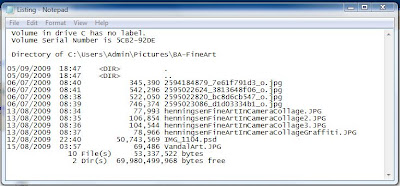
There is no simple way to do this in Vista, not sure about Windows 7 but I would be surprised if there was! The answer is to make a couple of tweaks to the registry, not as hard as it may sound and add a couple of files to the Windows directory/folder. There is a thread on the Vista Windows forum, which tells you how and provides the necessary files and registry tweaks, follow this link. It took me about 5 mins to work it out. The outcome will be two addition to the "Context Menu" as you will see from the screen-grab below. The option creates a text file in Notepad which you can view, edit and or print. Why don't Microsoft provide such an option? No don't answer that.


There is no simple way to do this in Vista, not sure about Windows 7 but I would be surprised if there was! The answer is to make a couple of tweaks to the registry, not as hard as it may sound and add a couple of files to the Windows directory/folder. There is a thread on the Vista Windows forum, which tells you how and provides the necessary files and registry tweaks, follow this link. It took me about 5 mins to work it out. The outcome will be two addition to the "Context Menu" as you will see from the screen-grab below. The option creates a text file in Notepad which you can view, edit and or print. Why don't Microsoft provide such an option? No don't answer that.

05/01/2010
Transferring BIG files
Have you ever had a problem sending a LARGE file to someone. Many email providers have an Max file size that you can send as an attachment. Sending films, PSD files etc can be a nightmare. I came across TransferBIGfiles How does it work? Here are the FAQ answers from the site:-
FAQ's
What is TransferBigFiles?
TransferBigFiles is the easiest way to share a bunch of files with friends, family or everybody in the world. There's no registration required to use the website. You can just go to the home page and start uploading some files.
What is the storage limit for my files?
TransferBigFiles does not limit the amount of space your account can use on our servers, the only storage limit we have is that your files may not be larger then one (1) gigabyte.
For how long are my files stored?
Files are stored for up to 5 days or until the download limit of 20 downloads is reached.
FAQ's
What is TransferBigFiles?
TransferBigFiles is the easiest way to share a bunch of files with friends, family or everybody in the world. There's no registration required to use the website. You can just go to the home page and start uploading some files.
What is the storage limit for my files?
TransferBigFiles does not limit the amount of space your account can use on our servers, the only storage limit we have is that your files may not be larger then one (1) gigabyte.
For how long are my files stored?
Files are stored for up to 5 days or until the download limit of 20 downloads is reached.
29/12/2009
Print off Google Calendar
Now is the time of year when my wife reminds me that she needs a new calendar. Being a cheapskate my normal practice is to open Outlook and print off the Outlook calendar, a month to a page, could not be easier.
But I now use Google Calendar to record my diary dates
There are a couple of solutions I found on the net, Wincalendar, being one, but it costs money. I found a workaround on the Google Calendar Forum it did not appear to work with my setup BUT after a bit of fiddling I managed to sort it out. So here is my solution:-
I use Firefox but I think this will work with IE as well.
Open your Google Calendar and set to show 1 month per page and set it to start at January 2010 unless you are reading this next year!
On the right hand side of the Calendar page there is a PRINT icon. When you click this you get a pop up window with a page view of the calendar. Choose the "Save As" option and click.
A further pop up appears with the options "Open With" or "Save File" choose "Save File".
Now the "Download" pop up appears, in my case this shows the calendar to have been downloaded as a PDF file. Right click on this and choose the option "Copy Download Link"
Open a text editor such as Notepad, Right Click and "Paste" you will find a link similar to the one below will appear (Don't Panic) This is the link to print off just January.
To print out the 12 months in one go you need to make a slight change to the link. Look for the numbers that I have highlighted, these are 20091228 and 20100201 you need to change the second one to read 20101231.
Select and Copy the link then paste into your Browser, in my case Firefox, and click. This will open up your default PDF software Acrobat Reader or in my case I use the Firefox PDF plugin Foxit Reader. This should display all 12 months of your calendar. You now can print off the 12 monthly pages.
"https://www.google.com/calendar/printable?ctz=Europe%2FLondon&dates=20091228%2F20100201&pgsz=letter&mode=MONTH&wkst=2&hl=en&src=YWpwZWVlQGdvb2dsZW1haWwuY29t&src=cGtobWwydDFhZTB1OGkxcGUyNXVybHJsOHNAZ3JvdXAuY2FsZW5kYXIuZ29vZ2xlLmNvbQ&src=ZDIxZHU5Zm92NHZkN2hnajNnZ2FhcWFzcmdAZ3JvdXAuY2FsZW5kYXIuZ29vZ2xlLmNvbQ&src=Z2ttYjA0M2UwNTBlM3RrMHJ0OWM1ZjNnazBAZ3JvdXAuY2FsZW5kYXIuZ29vZ2xlLmNvbQ&src=ZXFubmswamc3NmU5MWdhbjMzbGtpcDZzMDRAZ3JvdXAuY2FsZW5kYXIuZ29vZ2xlLmNvbQ&src=NW41ODBoM2tjcTlucmxqb2twdjY0cWZyMHNAZ3JvdXAuY2FsZW5kYXIuZ29vZ2xlLmNvbQ&src=bmVhcm5pbmVAZ29vZ2xlbWFpbC5jb20&src=amVubmlmZXJtbW9uZXlAZ29vZ2xlbWFpbC5jb20&src=bDdjMjJ2YWFpb3RsYTdocnExcmszZTA3Zm9AZ3JvdXAuY2FsZW5kYXIuZ29vZ2xlLmNvbQ&src=dWtfX2VuQGhvbGlkYXkuY2FsZW5kYXIuZ29vZ2xlLmNvbQ&pfs=NORMAL&po=
14/08/2009
Samsung NC10 Sound Problem
I have a Samsung NC10 netbook and it is brilliant. The sound however has driven me mad. The speakers are tinny but worst of all the sound was horribly distorted even with earphones. After much fiddling I eventually found the solution. I opened the Realtek Sound Effect Manager in Control Panel. Under the Sound Effect tab there is a Karaoke icon, make sure that there is no X showing in the circle. If there is click to turn off. Set the environment to Padded Cell. Success sound back to normal! Make sure all the equaliser sliders are on Max
29/05/2009
Creative Photography - Transfers
If I give you all my secrets about inkjet (image) transfers I shall have to kill you so be warned!
The process of transferring an inkjet image or any similar image, photocopy, magazine picture etc using an acrylic medium has been around for a long time. If you Google any combination of those words you will find loads of stuff. I have listed a few of the links I found useful and or interesting.
I have used inkjet prints both dye and pigmented inks. After much experimentation I settled on a digital inkjet paper sold by Granthams, Blackpool. It is ColourLink Matt Inkjet Paper, single sided 100g (UPDATE - this paper is no longer available from this source, try Jessops Matt 100g). You can use almost any paper to start with. As for the transfer medium, I started off using PVA glue, BQ own brand is cheap. It works well but can be unpredictable. You can try anything which contains acrylic polymers, emulsion paint, acrylic primer/undercoat, gesso, acrylic astists paint etc. I ended up using the Rolls Royce of acrylic ploymers "Goldens Regular Gel (Matte)". It is worth a visit to Goldens website thay have lots of info about acrylic transfer.
You can see some of my transfer artwork on alistairparkerart.com go to Gallery and choose "mixed media"
Here are a few links:-
http://nonphotography.com/blog/
http://www.flickr.com/photos/forgottenpittsburgh/1414931085/
http://www.squidoo.com/inkjetimagetransfer
http://www.art-e-zine.co.uk/imagepaper.html
The process of transferring an inkjet image or any similar image, photocopy, magazine picture etc using an acrylic medium has been around for a long time. If you Google any combination of those words you will find loads of stuff. I have listed a few of the links I found useful and or interesting.
I have used inkjet prints both dye and pigmented inks. After much experimentation I settled on a digital inkjet paper sold by Granthams, Blackpool. It is ColourLink Matt Inkjet Paper, single sided 100g (UPDATE - this paper is no longer available from this source, try Jessops Matt 100g). You can use almost any paper to start with. As for the transfer medium, I started off using PVA glue, BQ own brand is cheap. It works well but can be unpredictable. You can try anything which contains acrylic polymers, emulsion paint, acrylic primer/undercoat, gesso, acrylic astists paint etc. I ended up using the Rolls Royce of acrylic ploymers "Goldens Regular Gel (Matte)". It is worth a visit to Goldens website thay have lots of info about acrylic transfer.
You can see some of my transfer artwork on alistairparkerart.com go to Gallery and choose "mixed media"
Here are a few links:-
http://nonphotography.com/blog/
http://www.flickr.com/photos/forgottenpittsburgh/1414931085/
http://www.squidoo.com/inkjetimagetransfer
http://www.art-e-zine.co.uk/imagepaper.html
21/02/2009
Gmail: Searching for Unread Mail
There is no native means of searching for Unread Mail in Gmail. There is however a workaround. Enter is:unread in the Search Box, this will find all the Unread mail in the Inbox. Simple when you know how.
18/02/2009
What's gone wrong with AVG
I am not sure what AVG have done with the latest update to v8.1 but my XP laptop and my Vista64 Desktop will not update. Initially there was a problem with CTF files. I sorted that by deleating the currupt file. The next problem was every time there was an update the machines wanted to restart. Now I have a General Error. I have been around the forums and tried the various fixes suggest to no avail. I have installed and reinstalled again to no avail.
I have used AVG for as long as I can remember and have converted many others to the cause but along with many other, may be this is the time to change.
I am about to install Kaspersky Internet Security, available half price in W H Smiths at £23.50. Top of the pile in PC Pro tests, so here goes.
I have used AVG for as long as I can remember and have converted many others to the cause but along with many other, may be this is the time to change.
I am about to install Kaspersky Internet Security, available half price in W H Smiths at £23.50. Top of the pile in PC Pro tests, so here goes.
Photography a Criminal Offence
An item in Guardian 12 February 2009 warned that it will be a criminal offence to photograph police officers under anti-terrorism legislation which becomes law on Monday 16th Feb 09. Both professional and amateur photographers will be at risk of harassment under the new law. A major demonstration outside New Scotland Yard is planned for Monday by NUJ.
So I suppose the next time I take a photograph like this my feet won't touch the ground! But does he count? He is probably a civilian, in wolfs clothing!

Spotted on a surveillance job in Trafalgar Square.
So I suppose the next time I take a photograph like this my feet won't touch the ground! But does he count? He is probably a civilian, in wolfs clothing!

Spotted on a surveillance job in Trafalgar Square.
20/01/2009
Recent Post Widget
If you look to the right of this column you will see that I have a list of recent posts. This is created by a Widget designed by Blogger Buster. this widget references a JavaScript that parses your blog's feed and displays the titles of the most recent posts in a list. It overcomes the limitations of the Blogger Archive list. The Blogger Buster site has a Script Creator Form on the site so there is no messing around with cutting and pasting scripts.
This is a image of the form -

Read the instructions before you use the form, I didn't read the instructions the first time I used it and fiddled around for ages trying to get it to work! You need to leave off the http:// and the last / from your URL when you load it into the form.
Occasionally this form may not be available if the site is under pressure. If that happens come back later when things have quietened down. There will be a message to this effect.
Get the Widget here.
This is a image of the form -

Read the instructions before you use the form, I didn't read the instructions the first time I used it and fiddled around for ages trying to get it to work! You need to leave off the http:// and the last / from your URL when you load it into the form.
Occasionally this form may not be available if the site is under pressure. If that happens come back later when things have quietened down. There will be a message to this effect.
Get the Widget here.
07/01/2009
AVG update issue - Invalid update control CTF file
I am a great fan of AVG anti-virus but every now and again it does something stupid.This morning I was getting an error message:- "Invalid update control CTF file". A quick Google came up with all the usual crap about editing the registry etc. I thought, there has to be an easier way! Checked on the AVG site under support and at the top of the list was an item titled - "AVG update issue - Invalid update control CTF file". Which I read. I followed the instructions but the ino does not seem to apply to the FREE version. I could not find the place in the tool box which was suggested. It essentially suggested deleting all the files with ctf extension.
So I thought I will do it through Search in Windows Explorer, No ctf files. They may be hidden I thought, went into Tools> Folder Options> View and ticked Show hidden files and unticked Hide unprotected operating system files ( be sure to go back and change this when you have finished). I then searched for files with extension ctf. NOTHING drrrrr.... Then I noticed on the search menu there is an option to "Change whether hidden and system files are included" I thought I had done that all ready. However next search revealed 2 .ctf files which I duly deleted. Delighted to say next time I ran the AVG update it worked OK.
What do little old ladies do when they get these silly b***y problems? If they are anything like the little old ladies I know they ring me on a Sunday morning when I have just settled down with the paper!
So I thought I will do it through Search in Windows Explorer, No ctf files. They may be hidden I thought, went into Tools> Folder Options> View and ticked Show hidden files and unticked Hide unprotected operating system files ( be sure to go back and change this when you have finished). I then searched for files with extension ctf. NOTHING drrrrr.... Then I noticed on the search menu there is an option to "Change whether hidden and system files are included" I thought I had done that all ready. However next search revealed 2 .ctf files which I duly deleted. Delighted to say next time I ran the AVG update it worked OK.
What do little old ladies do when they get these silly b***y problems? If they are anything like the little old ladies I know they ring me on a Sunday morning when I have just settled down with the paper!
31/10/2008
Cheap Software Scam - Beware
I cam across an advert at the top of my Googlemail page today for cheap software. A quick survey of the forums suggests that a download of Adobe Photoshop CS3 for £19.50 from www.pick-go.com is a scam.
Experiences seem to vary from paying and receiving nothing to others who have received a fully working copy with updates. The general opinion is that the serial numbers are keygen generated and are probably volume licence keys which do not require registration but are eligible for updates. Interesting to note there are no contact details on the site. Further comments here.
Experiences seem to vary from paying and receiving nothing to others who have received a fully working copy with updates. The general opinion is that the serial numbers are keygen generated and are probably volume licence keys which do not require registration but are eligible for updates. Interesting to note there are no contact details on the site. Further comments here.
27/10/2008
Vista 64 bit Sound Recording Problem
My new computer runs under Vista 64 bit. Not the most user friendly operating system. Have Microsoft not heard the expression"if it ain't broke don't fix it"!
When I came to record the sound for an AV sequence using Audacity I found that it would not record either from the Internet of from the HD.
Checked all the usual things, preferences, control panel etc. I could only find two sound recording inputs, mic and line, no mixer!
Google wasn't much help, the usual, "check the drivers are up to date" rubbish. However with a bit more digging a helpful chap suggested the following solution.
Go to:- Control Panel> Sound> Recording Tab> right click on the white background and LOW AND BEHOLD a dialog box appears with the option to "Show Disabled Devices"! Which in my case was the Mixer. How bl**dy obtuse can Microsoft get? Why the hell do they not show these options in the control panel!
Anyway, problem solved, go to Audacity> Edit> Preferences> Audio I/O> Device there should noe be an option to select Mixer. Also interesting to note that when using Vista 64, in the Audacity Mixer Toolbar the device selection box is greyed out.
When I came to record the sound for an AV sequence using Audacity I found that it would not record either from the Internet of from the HD.
Checked all the usual things, preferences, control panel etc. I could only find two sound recording inputs, mic and line, no mixer!
Google wasn't much help, the usual, "check the drivers are up to date" rubbish. However with a bit more digging a helpful chap suggested the following solution.
Go to:- Control Panel> Sound> Recording Tab> right click on the white background and LOW AND BEHOLD a dialog box appears with the option to "Show Disabled Devices"! Which in my case was the Mixer. How bl**dy obtuse can Microsoft get? Why the hell do they not show these options in the control panel!
Anyway, problem solved, go to Audacity> Edit> Preferences> Audio I/O> Device there should noe be an option to select Mixer. Also interesting to note that when using Vista 64, in the Audacity Mixer Toolbar the device selection box is greyed out.
09/10/2008
Looking at Photographs
Check out this amazing photography site, PHOTOGRAPHY NOW. Worth a look just to see the amazing Java page turner! http://photography-now.net/
Subscribe to:
Posts (Atom)